This guidance for making eye-catching 2D images applies to ‘snapshots’ of 3D models and to the scenes at which a visualisation pauses or rotates. here
Thanks to SketchUp Materials Library.
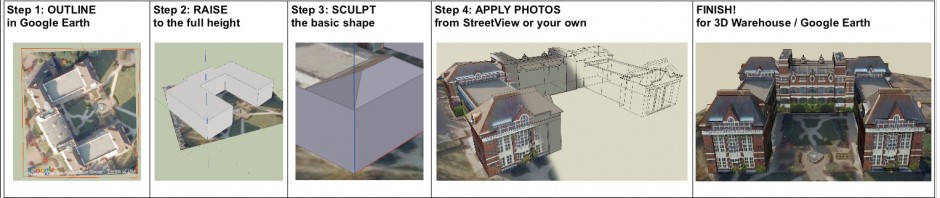
This guidance for making eye-catching 2D images applies to ‘snapshots’ of 3D models and to the scenes at which a visualisation pauses or rotates. here
Thanks to SketchUp Materials Library.
By the way, Inflite Engineering Services, a local company based in Stanstead, has a well-crafted 3D visualisation of an aircraft being overhauled here. (3 minutes or so; note the shadowing effects)
See also our previous post on this topic and the local BBC News article on this initially “dry” (alcohol-free) town here
Several of the locations used in the filming for The World’s End are in Letchworth Garden City, Welwyn Garden City and perhaps Dorking as listed in the Plots and Locations section of this wiki.
You are invited to:
If you start any of the above, please let us know so that we can help to avoid duplicated effort.
P.S. The Tourist Information Centre have put together a walking trail of the locations used here: article
“The trail is available to download here [Download PDF version @16KB, PDF] or you can pick up a copy at our Local & Tourist Information Centre, 33-35 Station Road, Letchworth Garden City.”
Here is an example of someone starting out to model an extension to a house, complete with its proposed fittings and furniture. The point here is to do so accurately enough to make sure that it all fits comfortable into the space available!:
Current cameras produce still images from a single point of view. Now research is being invested in ways of using ordinary or multi-lens digital cameras, together with post-processing software, to produce image files that are higher in quality or more versatile than that (boosted resolution, multi-focus, looking behind etc.!). article
Thanks to SketchUp Materials Library for these tips.
8 tips for scaling in SketchUp
“To use the Scale Tool, pre-select the object or objects you’d like to scale, then press (S) to activate the Scale Tool. …” here
A solution for low resolution textures
“Have you ever brought an image texture into SketchUp and notice that the resolution isn’t as crisp as it is in your image viewer?…” article & critical responses here (but beware of ‘spam’ posts)
By Leo Kelion, BBC News Technology reporter
“Details of a touchscreen showing 3D images that can be felt and manipulated have been published by Microsoft’s research unit. . . .” details
The Settlement in Letchworth Garden City has a new course: an Introduction to 3D Photography. details under “3D…” & below.
This is about stereoscopy, using ordinary digital photographs and Adobe Photoshop Elements software, not digital 3D modelling (even though Trimble SketchUp is mentioned in the course description). This is offered at a special fee of just £25 for 5 sessions.
____
Introduction to 3D Photography Tutor: Peter Freeman
Day: Tuesdays from 10th September 2013 Time: 10.00 am – 12 noon Room: 3
Excellent 3D pictures can be created by anyone who can take photographs on a simple Compact Digital Camera. Processing the images requires the use of a home computer, or laptop, loaded with Adobe Photoshop Elements. If learners don’t have to have the latest version, versions 5 onwards will work well and are cheaper to obtain on line.
By the end of the course learners will understand the simple principles on which 3D photographs are based and be able to construct your own 3D pictures, which can be viewed with, or without, the need for special glasses. Everything will be reduced to its simplest elements and rules of thumb to avoid the use of calculation.
It should be recognised that not everyone has 3D vision and, if learners have any doubts about this, it is advisable check with your tutor before joining the course.
Learners will need the following items for each session; Laptop loaded with Adobe Photoshop Elements (Ver. 5 on),Digital camera, the simpler the better!
The types of 3D photographs covered will be;
Freeview (Side by side photographs viewed without glasses)
Anaglyphs (Two pictures merged together in Photoshop viewed through red/cyan glasses (provided)
Various types of simple stereograms (viewed without glasses)
Magic-Eye type stereograms assembled in Photoshop from learner’s photographs (viewed without glasses)
During the course the tutor will demonstrate two freeware programmes that may be of interest to learners. Trimble SketchUp (www.sketchup.com) Stereo Photo Maker (www.stereo.jpn.org)
Discussion and questions will be encouraged and learners will be able to work on their own photographs if they wish. Learners will also be encouraged to improve their skills by undertaking a few simple photographic exercises between classes.
A 5 week course. Fees £25 plus Settlement membership.
If you are just beginning to use SketchUp, these tips will help you to pick up good habits early: here
Even if you are experienced, it’s worth checking them for a reminder of what makes using this tool much easier!
Here’s a reminder of The Stereoscopic Society, whose leaflets are available by the rear desk in David’s Bookshop. site
“Projected 3D is a feature of most of our meetings … as wellas at our Annual Convention.”
“Monthly meetings of the Stereoscopic Society which take place in London and Coventry from October to April have a club atmosphere. They typically include projection of members’ and guests’ film and digital work onto large 10ft screens viewed with polarising glasses. The programs also include workshops, show and tell sessions and an annual auction of members superfluous and unwanted 3D equipment. Attending the meetings and the annual convention are the ideal opportunities to meet up with people who have similar interests.”